Product overview

About Precision Maps

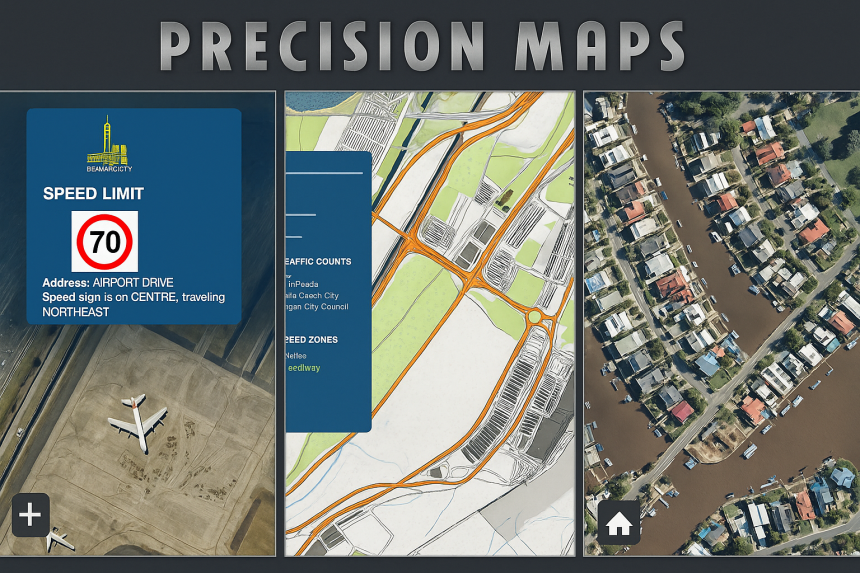
Precision Maps is an offline-first mapping suite built for traffic control, civil works, utilities, engineering and planning teams — designed to reduce imagery costs, increase reliability, and keep field workflows fast.

Offline-first
PouchDB → MySQL Sync
Nearmap-ready
Export & Stitch
Precision Maps preview

Core Capabilities

🗺️ Base Layers

Flexible basemaps

  • Esri OSM – Standard OpenStreetMap basemap via Esri
  • Offline Nearmap – Cached high-resolution aerial imagery with on-demand refresh (requires Nearmap subscription)
  • Google Maps – Familiar street / satellite tiles
  • Topographic Map – Terrain-focused basemap for planning & analysis
🚦 Data Overlays

Traffic & planning layers

  • Custom Bases – Import GeoJSON, KML, or KMZ layers
  • Speed Zones – Road-speed data for traffic management planning
  • Traffic Counts – Clustered AADT + vehicle-class breakdown
  • Bus Stops & Cameras – Visualise transit and monitoring points
⚙️ Tools & Features

Built for real workflows

  • Intelligent Caching – Tiles first stored locally in PouchDB and synced to your MySQL server; dramatically reduces Nearmap requests and data charges (requires Nearmap subscription)
  • File Import / Export – Load and export KML, KMZ, GeoJSON
  • Tile Stitching – Export selected areas as a single Nearmap PNG
  • Measurement Tool – On-map distance and area calculations
🔎 Productivity

Speed + accuracy

  • Timestamp Check & Force Refresh – Compare local versus server imagery dates, update when newer data exists
  • Search & Geocoder – Instantly locate and view your own job sites or project areas by address or name, alongside layers like Speed Zones and Traffic Counts
  • Marker Clustering – Smooth performance with large datasets
  • Street View Integration – One-click access to Google Street View

How-to Videos

Short walkthroughs for the most-used Precision Maps workflows.

Getting Started

Quick introduction and basic navigation.

Base Layer

Switch between Esri OSM, Google, Topographic and Offline Nearmap.

Offline Layer

Working offline and refreshing imagery when newer data exists.

Features

Highlights of core tools and workflows.

Measure

Distance and area measurement on the map.

Search

Find job sites and project areas by name or address.

Tile Stitch

Export selected areas as a single PNG image.

Export Base

Export base layer selections for sharing and archiving.

Export Layer

Export overlay layers (KML/KMZ/GeoJSON workflows).

Menu Data Layer

Using overlay menus and data layer controls.